

Case Study 1: Network & Security Design for Small and Medium-sized Enterprises (SMEs)
Scenario:
Design a network for a small and medium-sized business with 20-300 employees.
The company requires a secure Wi-Fi network, a guest network, file sharing capabilities, and VPN for remote branches & workers.
Solution:
- Implement dual-band wireless access point with enterprise-grade firewall feature to support both 2.4 GHz, 5 GHz and 6 GHz frequencies for better performance and less interference.
- Set up a VLAN for the guest network to segregate traffic and enhance security.
- Implement a NAS (Network-Attached Storage) for centralized file sharing with access controls based on user roles.
- Configure the client-to-site or site-to-site VPN service to manage secure remote access to the company’s network.
Tips:
- Use WPA3 for Wi-Fi security and regularly update passwords.
- Limit the bandwidth for the guest network to ensure priority for business operations.
- Regularly back up the NAS to an offsite location for disaster recovery.
- Train employees on VPN usage and security best practices.
Case Study 2: Securing a Network Against Intrusion
Scenario:
A company has experienced a data breach. The task is enhanced their network to prevent future intrusions.
Solution:
- Redesign the network infrastructure.
- Install and configure the enterprise-grade firewall with security analysis & log management tool to monitor and control incoming and outgoing network traffic.
- Enable DoS and DDoS policy to prevent the server or web application overloading with the goal of interrupting services.
- Implement an IDS/IPS (Intrusion Detection System/Intrusion Prevention System) to detect and prevent attacks.
- Conduct a vulnerability assessment and patch any identified security gaps.
Tips:
- Keep all systems and security devices updated with the latest patches.
- Regularly review firewall and IDS/IPS logs to detect any unusual activity.
- Train employees on security awareness, including recognizing phishing attempts and safe internet practices.
Case Study 3: Upgrading a Wireless Network
Scenario:
One of the hottest HK tourist spots needs to upgrade its wireless network to accommodate a growing number of devices and to improve coverage and performance.
Solution:
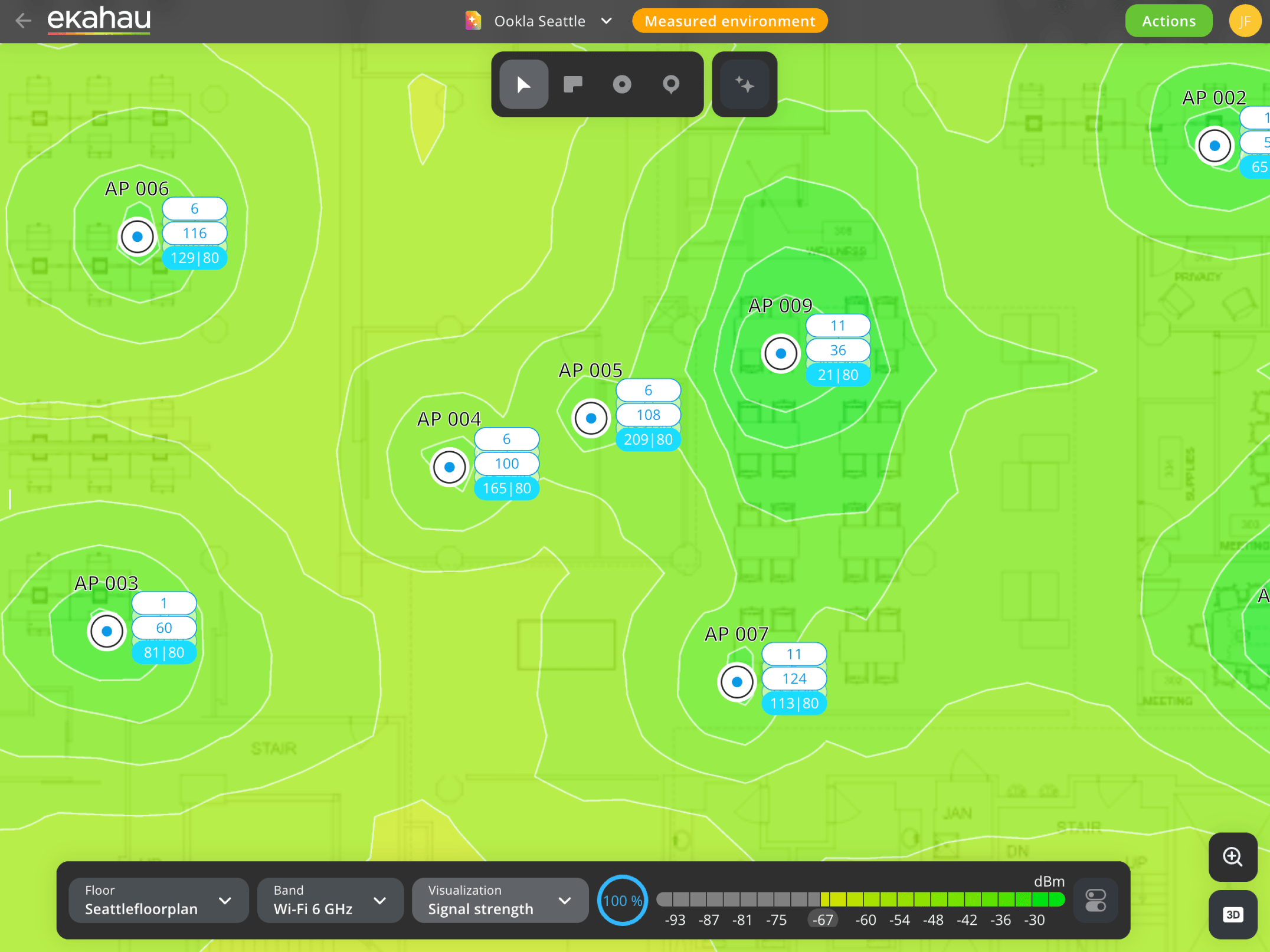
- Perform a detailed site survey with Ekahau professional tools to identify optimal locations for access points and to determine the necessary density for adequate coverage.
- Deploy a wireless network to provide extensive coverage without the need for extensive cabling.
- Upgrade to Wi-Fi IEEE 802.11 access points for better performance and efficiency in high-density environments.
- Implement a wireless network management system for monitoring and maintenance.
Tips:
Having the right tools for proper design is fundamental for deploying and maintaining today’s mission-critical wireless networks.
Ekahau is the global leader in Wi-Fi performance tools and Ekahau’s software can help to place the right number of access points (APs) in the right locations, with the right configurations to meet the wireless connectivity needs of the business.
- Conduct a site survey to determine optimal placement of access points for maximum coverage and performance.
- Implement strong authentication and encryption methods for network access.
- Regularly update the wireless infrastructure to adapt to new technologies and security threats.
Case Study 4: Implementing Network Security for HK listed company
Scenario:
One of the HK listed company needs to upgrade its network security to protect patient data and comply with Center for Internet Security (CIS) Benchmarks.
Solution:
- Risk Assessment : Conduct a thorough risk assessment to identify potential vulnerabilities in the network that could lead to data breaches.
- Access Controls : Implement strong access controls, ensuring that only authorized personnel can access sensitive patient information.
- Encryption: Encrypt data both at rest and in transit to prevent unauthorized access.
- Intrusion Prevention : Deploy an intrusion prevention system (IPS) to monitor network traffic for suspicious activity and take immediate action to block threats.
- Regular Audits : Schedule regular audits and penetration tests to evaluate the effectiveness of security measures and identify areas for improvement.
- Policy Development: Develop clear policies regarding data handling, access, and breach notification procedures.
Tips:
- Ensure all network devices are regularly patched and updated to protect against known vulnerabilities.
- Provide ongoing training to staff about security best practices and how to identify potential phishing or social engineering attacks.
- Have a robust incident response plan in place to quickly address any security incidents that occur.
Case Study 5: Server room migration for global luxury goods company
Scenario:
One of the global luxury goods companies need to migrate the production site to new data center and change the existing data center to an off-site backup site, and eventually a disastrous recovery site. The main objective is progressively meet customer’s group requirement & standard for IT architecture and execute a flawless no-downtime (or minimizing downtime) data center relocation.
Solution:
Essential Planning Components for Minimizing Downtime
- Comprehensive Project Scoping
- Risk Assessment and Risk Mitigation Mapping
- Stakeholder Involvement and Communication Tree
- Developing Server Room Relocation Checklist
- Hardware inventory and health validation review
- Backup verification and restore testing
- Site readiness checklist at the destination (redundant power, cooling, cabling, physical security)
- Work with Telco for related services relocation and processing time
- Diagram for new network infrastructure, rack design with power load, cabling architecture, firewall & switch ports assignment, etc.
- Logistics, insurance and packing materials (anti-static transportation tools)
- Scheduling and sequencing timelines
- Disconnection/labeling diagrams
- Post-move system validations and performance benchmarks
- Backup and Redundancy – Move Insurance
- Phased Migration Strategy – Reducing Complexity
- New Site Preparation – A Non-Negotiable Factor
- Testing and Validation – The Final Benchmark
- Pro Tips for Exceptional Outcomes
Tips:
Thorough preparation is crucial for project success
Executing a flawless no-downtime (or minimizing downtime) data center relocation now is not a dream – it’s a technical and managerial challenge that can be met with rigorous planning, cross-functional coordination, phased migration strategies, and professional support. By adhering to these data center migration best practices, Project or IT leaders can protect business continuity and security while future-proofing operations for growth and agile scalability.
From verifying site readiness to leveraging robust backup systems and employing dedicated data center relocation services, moving critical infrastructure no longer has to be a leap into the unknown. By following this tips, it is enabling your enterprise to execute relocations with full confidence and minimize IT infrastructure moving risk every step of the way.
Case Study 6: Troubleshooting Wi-Fi signal performance and coverage for a global automotive distributor
Scenario:
One of the global automotive distributors plan to troubleshoot and solve their Wi-Fi signal performance and coverage issues over 20 sites in HK and Macau.
Solution:
Redesigning existing Wi-Fi networks
Site Survey the environment
Walk the site with the Ekahau Sidekick 2 to collect comprehensive, real-world Wi-Fi and spectrum data. Innovative features like Just Go Survey mode make data collection remarkably simple by using augmented reality to automatically create floor plans as walk.
Create an AI-Powered Model
Transform the ultra-accurate survey data from your Sidekick 2 into a simulated RF model of the network. There would get a precise view of how signals behave in the buildings, accounting for construction materials, obstructions, and other factors that might not be visible on a floor plan – drastically improving design accuracy over traditional methods and eliminating costly trial-and-error.
Determine updated connectivity requirements
A network refresh is an opportunity to align the infrastructure with future business needs. Define the new requirements for performance, accounting for increased device density and high-bandwidth applications.
Simulate network upgrades
Easily model and validate upgrade scenarios. This can simulate replacing existing APs with the latest Wi-Fi models, see how adding new access points addresses coverage gaps, and compare the performance of different vendor brands with a single click.
Tips:
Having the right tools for proper design is fundamental for deploying and maintaining today’s mission-critical wireless networks.
Ekahau is the global leader in Wi-Fi performance tools and Ekahau’s software can help to place the right number of access points (APs) in the right locations, with the right configurations to meet the wireless connectivity needs of the business.
Design Wi-Fi networks
- Define your environment
- Determine your connectivity requirements
- Choose your Access Point model
- Pinpoint ideal Access Point locations
- Deploy with confidence
 |  |
